
How to Automate B2B Sales Prospecting in 2026
Table of Contents
- Why Manual B2B Sales Prospecting Breaks at Scale
- Map Your Sales Prospecting Workflow Before You Automate Anything
- B2B Sales Prospecting Tools: What Each Category Actually Does
- Automated Lead Qualification and Lead Scoring
- B2B Prospecting Email Templates That Survive Automation
- Governance, Privacy, and Deliverability Rules to Set First
- Measuring Results and Fixing What Breaks
- Frequently Asked Questions
Last Updated: October 8, 2026
Why Manual B2B Sales Prospecting Breaks at Scale
Manual B2B sales prospecting fails once your lead list outgrows your team's hours.
That gap is expensive. Most businesses sit on databases full of contacts nobody has touched in months.
Speed makes it worse. The first business to respond usually wins.
This guide covers how to automate B2B sales prospecting without losing the human touch: the workflow, the tools, and the guardrails.
Map Your Sales Prospecting Workflow Before You Automate Anything
Automation without a mapped workflow just speeds up chaos. Document each stage first, then decide what a machine should handle. The key is the handoff map: most guides stop at "define your stages" and never show how data moves between systems.
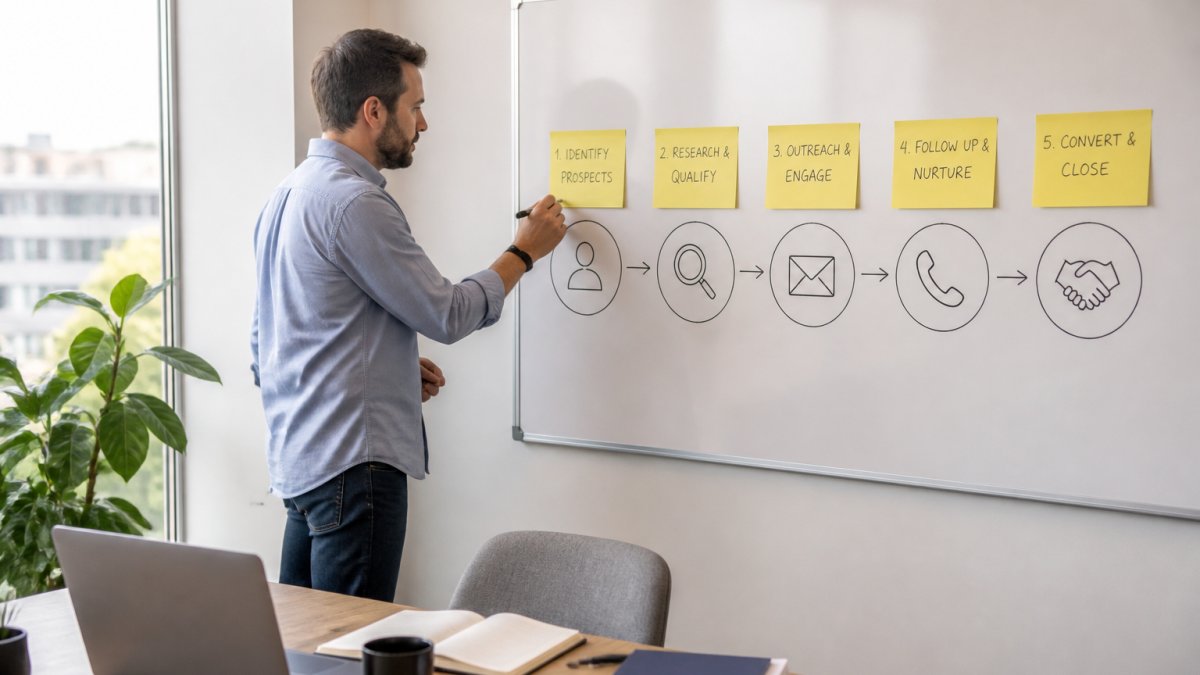
The five stages every prospecting workflow shares
- Define your ideal customer profile. List the firm size, industry, and role you sell to.
- Build your target account list. Pull names from your CRM, website forms, and events.
- Qualify each lead. Score fit and interest before a rep spends time.
- Reach out on multiple channels. Email, SMS, phone, and social, in a set order.
- Book the meeting. Route the reply to a calendar, not a rep's inbox.
The handoff map: triggers, conditions, and routing rules
A stage list is not a workflow. A workflow is a set of triggers and conditions that move a record between stages without a human pushing it. Write these down before you buy anything.
Stage 1 to 2, ICP match to account list.
- Trigger: a new CRM account or form submission.
- Condition: firmographics (employee count, industry, region) match your ICP rules.
- Action: the account joins a named target list, tagged with source.
Stage 2 to 3, Account list to qualification.
- Trigger: enrichment completes with at least one verified email or phone.
- Condition: fit score crosses your threshold (for example, 60 of 100 on firmographics).
- Action: the contact enters the scoring queue; low-fit contacts route to nurture.
Stage 3 to 4, Qualification to outreach.
- Trigger: score crosses the outreach threshold, or a buying-intent signal fires.
- Condition: not on a suppression list, not contacted in 30 days, and valid consent on file for the channel.
- Action: the contact enrolls in the matching cadence (cold, warm, or intent-triggered).
Stage 4 to 5, Outreach to meeting.
- Trigger: a positive reply, booked link click, or inbound call.
- Condition: the contact is not already in an active deal.
- Action: route to a rep by territory or round-robin, and create a calendar hold.
Stage 5 to closed-loop, Meeting to CRM update.
- Trigger: the meeting is marked complete or no-show.
- Condition: the rep populates the outcome field within 24 hours.
- Action: the record advances to opportunity or returns to nurture with a reason code.
Where automation pays off and where it does not
Automation wins on repetitive, high-volume tasks. It struggles with nuance.
- Automate: data entry, list building, first-touch emails, follow-up timing, lead routing, CRM field updates, suppression checks.
- Keep human: pricing talks, objections, any deal above your set value threshold, and any message that references something the system cannot verify.
Rule of thumb: if a step has a clear trigger, condition, and next owner, automate it. If any is fuzzy, keep a human in the loop until you can write the rule down.
B2B Sales Prospecting Tools: What Each Category Actually Does
Sales prospecting tools split into five categories, each solving a different problem. Buying one tool to do all five usually wastes money.
| Category | What It Does | Best For |
|---|---|---|
| Contact data | Finds and verifies emails and phone numbers | Building a clean list |
| Sales intelligence | Tracks intent signals and buying triggers | Prioritizing target accounts |
| Sales engagement | Runs email cadences and follow-up sequences | Multi-channel outreach |
| Lead scoring | Ranks leads by fit and activity | Automated lead qualification |
| CRM | Stores contacts and tracks pipeline stages | Managing the whole workflow |
Most teams start with a CRM, then add data and engagement tools. The mistake is stacking overlapping tools: two systems doing the same job means double the cost and half the clarity.
For teams that want the outreach layer handled end to end, SkyWebAI offers autonomous AI sales agents that qualify leads and book meetings.
Automated Lead Qualification and Lead Scoring
Automated lead qualification uses rules and scoring to sort leads before a rep sees them.
The scoring model is simple: points for fit, points for behavior.
- Fit signals: job title, company size, industry, budget range.
- Behavior signals: pricing page visits, email opens, demo requests, repeat site visits.
Set a threshold: leads above it go straight to a rep, leads below it enter nurture.
Signal-based targeting sharpens this: when a target account shows buying intent, the system flags it and triggers outreach within minutes, not days.
B2B Prospecting Email Templates That Survive Automation
B2B prospecting email templates work only when they leave room for personalization. A template that reads like a mass blast gets ignored or marked as spam.
The fix: a template with fixed structure and variable fields. The structure stays; the details change per lead.
Here is a template you can use today:
Subject: Quick question about [Company]'s [specific goal]
Hi [First Name],
I noticed [specific detail about their business or role]. Most [job title]s we work with are dealing with [common problem].
We help teams like yours [specific outcome] without [common pain point].
Worth a 15-minute call this week?
[Your Name]
Three rules keep templates from sounding robotic:
- One personalization field minimum. Reference something real about the lead.
- Short sentences. Long paragraphs read like marketing copy.
- One clear ask. A single call to action beats three.
Cadence matters too. A three-to-five-touch sequence spaced a few days apart outperforms a single send. Vary the channel: email first, then SMS or a call if there is no reply.
Governance, Privacy, and Deliverability Rules to Set First
Governance is the part most guides skip, and the part that protects you.
Start with consent. Under the Telephone Consumer Protection Act (TCPA), businesses need prior express consent before sending automated texts or calls.
Deliverability comes next. A domain with no sending history gets flagged fast.
A simple governance checklist:
- Confirm written consent for SMS and automated calls
- Add an opt-out line to every email and text
- Cap daily send volume per domain
For SMS specifically, Federal Communications Commission guidance on robocalls and robotexts is the place to start.
Measuring Results and Fixing What Breaks
Measurement tells you which parts of your automation actually work. Activity volume is not a result: a cadence that sends 10,000 emails and books two meetings is worse than one that sends 500 and books ten. Build the framework around outcomes, then work backward to the inputs you control.
The four numbers to track first
| Metric | What It Tells You | Fix If It Drops |
|---|---|---|
| Response rate | How well your outreach lands | Rewrite subject lines and openers; check deliverability |
| Meeting booking rate | How many replies convert | Tighten your call to action; shorten the ask |
| Speed to lead | How fast you respond | Automate first-touch routing; set a hard SLA |
| Qualified lead rate | How good your targeting is | Refine your ideal customer profile; re-check enrichment data |
The pipeline math that connects activity to revenue
A single metric in isolation tells you nothing. Chain them so each target derives from the one after it.
Work backward from revenue:
- Revenue target for the quarter, divided by your average deal size, gives the number of closed-won deals you need.
- Closed-won deals divided by your historical win rate gives the number of qualified opportunities you need.
- Qualified opportunities divided by your meeting-to-opportunity rate gives the number of meetings you need to book.
- Meetings divided by your reply-to-meeting rate gives the number of replies you need.
- Replies divided by your response rate gives the number of contacts you need to reach.
That last number is your outreach volume target. If the math says you need 4,000 contacts at a 2 percent response rate, you either raise the response rate, raise the volume, or lower the revenue target.
Teams often fixate on volume when the real lever is response rate. Doubling response rate from 2 to 4 percent cuts required volume in half, usually cheaper than doubling send capacity.
Attribution: pick one model and defend it
Attribution is where most teams get lost. If three tools touch a lead, which gets credit? There is no universally correct answer, but four models are common:
- First touch: credit the source that created the contact. Good for measuring top-of-funnel investment.
- Last touch: credit the source that produced the reply or meeting. Good for measuring the closing cadence.
- Linear: split credit evenly across every touch. Good for long, multi-channel sequences.
Pick one, document it, and apply it consistently. Switching models mid-quarter to make a channel look better is how teams chase ghosts. If you cannot decide, start with position-based, it matches how buyers experience a multi-channel sequence.
Failure modes and the specific fix for each
- Low response rate. Usually a list problem, not a copy problem. Check bounce rate first. If bounces are under 2 percent and replies are flat, the personalization field is probably empty or generic. Fix: require one verified, non-template detail per send.
- High bounce rate. Contact data is unverified or stale. Fix: re-run enrichment on lists older than 90 days, and suppress any address that has bounced twice.
- Slow speed to lead. Routing rules have a gap, often a time-of-day condition or missing owner. Fix: audit for unhandled branches and set a fallback owner for every path.
Test one change at a time. Change the template, cadence, and list at once and you learn nothing.
Frequently Asked Questions
Which parts of B2B sales prospecting should you automate?
Automate the repetitive, rules-based steps: list building, data enrichment, lead scoring, first-touch sequencing, follow-up cadences, and meeting booking. Keep human judgment on message strategy, objection handling, and any conversation where a prospect signals buying intent. A practical split is to let software handle the first three touches and the scheduling, then route replies to a rep. That keeps response times fast without making your outreach sound like everyone else's.
How do you qualify B2B leads automatically?
Score leads on two axes: fit and behavior. Fit comes from firmographic data like industry, company size, and technology stack. Behavior comes from email opens, link clicks, site visits, and reply sentiment. Set a threshold, then let the system route anything above it to a rep and nurture the rest. Automated lead qualification works best when you review the scoring rules quarterly, since buyer behavior shifts and stale rules quietly send good prospects to the nurture pile.
How can you personalize automated sales outreach without sounding like a robot?
Personalize the first line, not the whole email. Pull one verifiable detail from the prospect's company page, a recent announcement, or a job posting, and reference it in a single sentence. Keep the rest of the message short and specific about the problem you solve. Merge tags for first name and company are table stakes; the detail that proves you looked is what earns a reply. Test two or three opening lines per segment rather than rewriting the entire sequence.
How do you measure the results of sales prospecting automation?
Track four numbers weekly: reply rate, positive reply rate, meetings booked per 100 contacts, and cost per meeting. Compare them against a manual baseline you recorded before automating, or against a control segment you leave untouched. Attribution gets murky across channels, so log the first touch and the converting touch separately. If reply rates climb but meetings stay flat, your qualification threshold is too loose and you are booking conversations with people who cannot buy.